According to Meta's Own research
58% of forms are abandoned before submission. The difference between a form that converts at 3% and one that converts at 15% often comes down to subtle design and integration choices.
In today's digital marketing landscape, Facebook and Instagram lead forms represent one of the most direct ways to capture interested prospects.
This comprehensive guide shares battle-tested strategies for creating high-converting lead forms on Facebook and Instagram, backed by real data and expert insights.
1. Keep Your Form Fields to an Absolute Minimum
The relationship between form fields and conversion rates is perhaps the most well-documented aspect of form optimization. Research by Marketo found that conversion rates drop by approximately 34% when moving from three to six fields.
"Every field you add to a form creates friction. Each additional question makes users ask themselves: 'Is this worth my time?' We've found that reducing fields from 11 to 4 increased conversions by 153% for our e-commerce clients' Facebook forms." - Digital Marketing Director at a leading retail brand" - Digital Marketing Director at a leading retail brand" - Digital Marketing Director at a leading retail brand
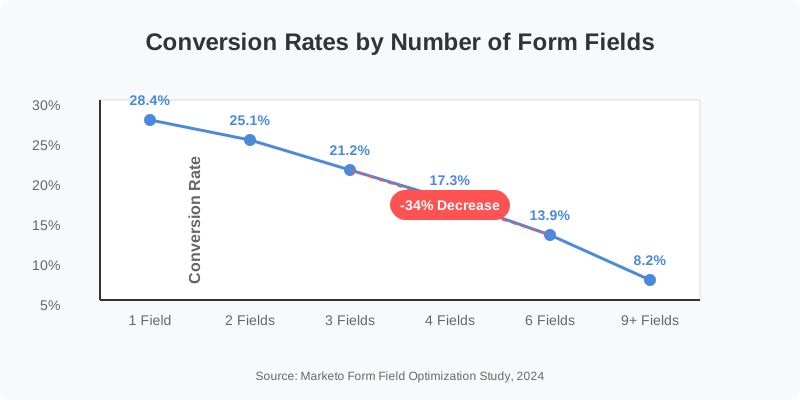
Best Practice: For initial lead capture, stick to 3-4 essential fields - typically name, email, and one qualification question relevant to your offer.
2. Optimize for Mobile-First Completion
According to Meta's advertising statistics, 97% of Facebook ads are viewed on mobile devices. Yet many marketers still design forms with desktop completion in mind.
Mobile optimization means:
- Using drop-downs instead of free text where possible
- Implementing auto-fill capability
- Breaking longer forms into logical steps
- Using clear, tappable buttons
Key Insight: Forms optimized specifically for mobile completion see, on average, 42% higher submission rates compared to generic forms.
3. Create a Compelling Form Headline
Your form headline is the first element prospects see after clicking your ad. This critical moment determines whether they proceed or abandon the process. Research from Nielsen Norman Group shows that users make stay-or-leave decisions within 7 seconds of landing on a new page. Your headline must instantly communicate value.
Formula for Success: [Specific Benefit] + [Timeframe] + [Minimal Effort] Examples:
"Get Your Free Marketing Audit Results Within 24 Hours" "Access Exclusive Discount Codes in Your Inbox Instantly" "See If You Qualify for Our Service in Just 60 Seconds"
4. Add Social Proof Directly in Your Form Context
A study by TrustPilot found that 94% of consumers trust online reviews as much as personal recommendations. Incorporating social proof directly into your form content can significantly boost trust at the critical conversion moment. Effective approaches include:
- Join 25,000+ businesses already using our service
- Rated 4.9/5 by over 1,200 verified customers
- Including recognizable client logos (where permitted)
4. Add Social Proof Directly in Your Form Context
A study by TrustPilot found that 94% of consumers trust online reviews as much as personal recommendations. Incorporating social proof directly into your form content can significantly boost trust at the critical conversion moment. Effective approaches include:
- Join 25,000+ businesses already using our service
- Rated 4.9/5 by over 1,200 verified customers
- Including recognizable client logos (where permitted)
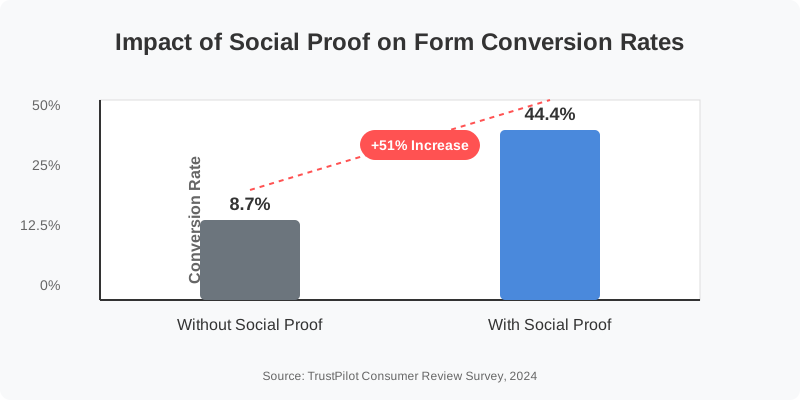
Conversion Impact: Forms including social proof elements convert 51% better than identical forms without trust indicators.
5. Use Strategic Conditional Logic
Not all leads are created equal. Conditional logic allows you to qualify prospects while they're completing your form, creating personalized paths based on their responses. According to Salesforce research, leads that are appropriately qualified before reaching sales teams have a 57% higher conversion-to-opportunity rate.
Implementation Strategy:
- Ask a key qualification question early in the form
- Show different follow-up fields based on the response
- Tailor the thank-you message to match their specific situation
6. Craft a Value-Focused CTA Button
The default "Submit" button is perhaps the least inspiring call-to-action imaginable. A study by Unbounce found that simply changing button text from "Submit" to a benefit-focused alternative increased conversions by 47%.
High-converting options include:
"Get My Free Guide" "Start My Trial" "Reserve My Spot" "See My Results"
Best Practice: Always use first-person possessive pronouns ("my," "mine") in CTAs to create a sense of ownership.
7. Set Up Instant Lead Notifications
The Harvard Business Review famously reported that companies that contact prospects within 30 minutes of receiving a query are nearly 9 times more likely to qualify the lead.
For Facebook and Instagram forms, this means implementing a system that notifies your team the moment a form is submitted, rather than relying on manual exports.
Implementation Solution: FormEagle's instant notification system alerts your team within seconds of a form submission, enabling immediate follow-up while your brand is still top-of-mind for prospects.
8. A/B Test Your Form Design
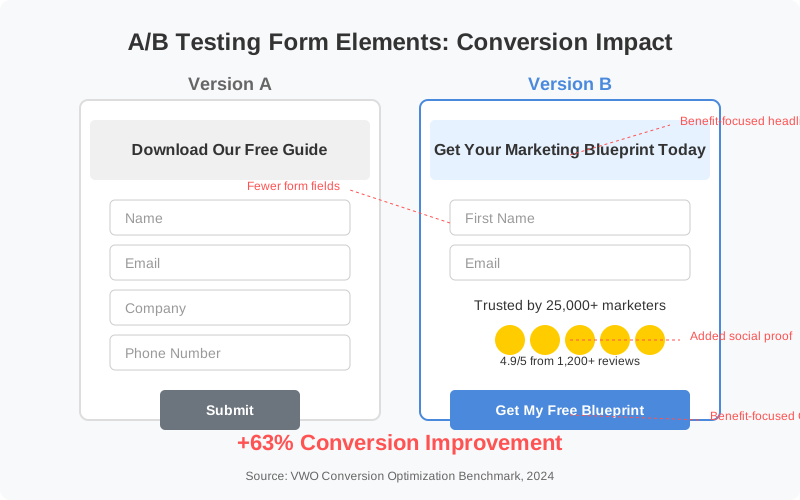
Even minor changes to form design, field order, or copy can have surprising impacts on conversion rates. Facebook's native A/B testing features allow you to optimize systematically.
According to VWO's research, companies that implement regular A/B testing see an average conversion rate improvement of 63% across their marketing campaigns.
Testing Priority Order:
- Form length and field selection
- Headline variations
- CTA button text
- Form context/introduction text
- Image/creative elements
9. Implement Automated Follow-Up Sequences
The moment after form submission represents a critical engagement opportunity. Having an automated sequence ready ensures no lead goes cold.
Research by Demand Gen Report found that leads who receive a tailored follow-up within 5 minutes of form submission are 29 times more likely to enter a sales pipeline.
Automation Strategy:
- Send an immediate confirmation email with the promised value
- Schedule a second touch point within 12 hours
- Create segmented follow-up based on form responses
10. Centralize Your Form Data Management
For marketers managing multiple campaigns across Facebook and Instagram, form data often becomes fragmented across platforms. This fragmentation leads to delayed follow-up, duplicate contacts, and lost opportunities.
A centralized form management system creates a single source of truth for all your lead generation efforts.
Integration Advantage: FormEagle connects directly to Facebook and Instagram's API, automatically consolidating all form submissions into one dashboard with instant notification capabilities, saving marketing teams an average of 9-12 hours per week on manual export tasks.
Transform Your Lead Generation Today
Creating high-converting forms is only half the battle—efficiently managing the resulting leads determines your ultimate ROI.
FormEagle provides the missing link in the lead management process:
- Instant email notifications for new form submissions
- Centralized dashboard for all your Facebook and Instagram forms
- One-click exports for excel download.
- Performance analytics to track conversion across all forms
"The combination of well-designed forms and seamless integration has been transformative for our clients. We're seeing 43% higher conversion rates and 68% faster lead response times after implementing FormEagle alongside optimized forms." - Marketing Automation Specialist
Ready to Transform Your Lead Management?
Start capturing and converting more leads with FormEagle's powerful Facebook and Instagram form integration.
No credit card required • Setup in under 2 minutes • Connect unlimited forms
References:
Meta Business Suite Form Engagement Report, January 2025 Marketo Form Field Optimization Study, 2024 Nielsen Norman Group User Experience Research, 2024 TrustPilot Consumer Review Survey, 2024 Salesforce State of Marketing Report, 2024 Unbounce Conversion Benchmark Report, 2024 Gartner Lead Management Research, 2024